It’s Monday morning at the warehouse. Stock has gone missing from the loading area, and nobody seems to have a clue how it happened.
The warehouse manager does what anyone would do and opens the CCTV.
The footage is great. Sharp, colourful, perfectly exposed. Except it shows a roller door that stayed firmly shut all weekend. Aside from a pigeon that flew past on Saturday afternoon, zero activity.
So the camera was on the entire time, and the picture quality is excellent. And then it becomes clear that the side gate - the actual scene of the crime - sits about three metres outside the edge of the frame.
A live image tells you a camera has power - but power alone is not enough to show you what went wrong. After an incident, four things need to be true: the camera was looking at the right place, the picture was clear enough to show what happened, the footage was still there when someone went looking, and somebody could actually get it out of the system. When CCTV disappoints, it’s usually because one of those four has slipped without anyone noticing.
Cameras are generally positioned to suit the building as it was on install day. Then life happens. Shelving gets moved, a new bay opens, a tree gets bigger, a skip bin takes up permanent residence in front of the lens, and a cleaner’s ladder nudges a housing a few degrees to the left.
Walk the site with a rough sketch and mark what each camera can see. Then ask a slightly uncomfortable question: if someone wanted to get in, or out, without being noticed, which way would they go? It’s common to find that entry doors are well covered while the paths between them are not.
Check the live view of every camera for obstructions, and check that none has drifted from where it was aimed.
Most cameras look fantastic at 2pm. The real test is 2am.
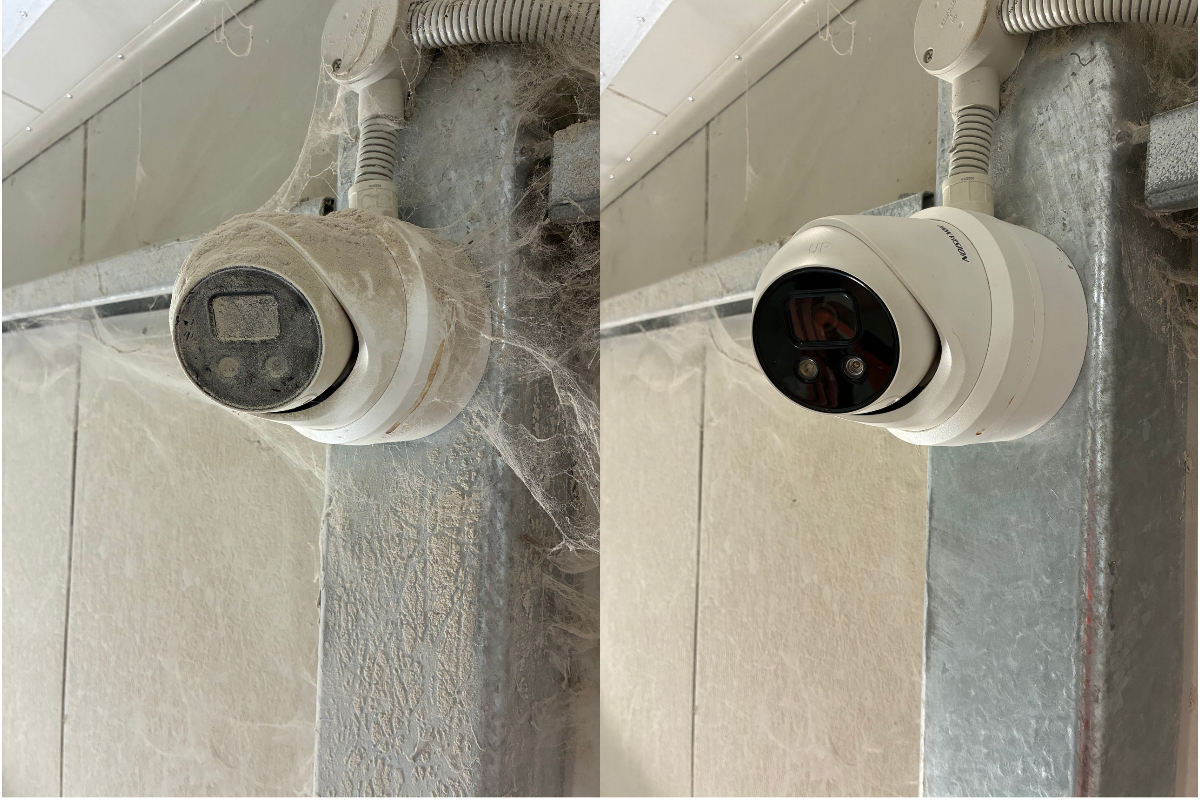
Infrared light bounces off whatever is close to the lens, including cobwebs, a nearby wall or a window, and turns the image into a white wash. Headlights and street lighting can leave everything else in shadow. Dark clothing against a dark background can turn a person into a rumour.
There’s also a difference between detecting that someone was there and identifying who they were. A grainy figure crossing a car park is evidence that something happened, but it won’t tell an insurer or the police much else. Look at your night footage at night, and ask honestly whether you could pick out a face, a vehicle or a number plate. Sometimes the fix is a different camera or a better position. Sometimes the software and system for reviewing footage needs an upgrade.
We often reach for UniFi Protect for residential and small business settings, and Hikvision AcuSense for larger commercial settings - although that’s not a hard and fast rule.
Security is far more nuanced than simply assessing the size of a property; we always prefer an initial consultation to get the full picture, so that we can tailor a solution to fit.
How long a recorder keeps footage comes down to arithmetic: the number of cameras, their resolution, the frame rate, whether they record continuously or only on motion, and the storage capacity of the drives. A system that held 14 days of footage when it was installed can shrivel pretty quickly once you add a few cameras or upgrade to higher resolution.
A better question to ask is how long it usually takes you to find out that something has happened. A stock count at the end of the month, an insurance query, a neighbour mentioning something a fortnight later. Incidents are often discovered well after they occur, so retention needs to match how long that discovery takes, not how long the recorder happens to hold.
(Check out our Christmas shutdown checklist for more on footage retention)
Let’s say the footage exists and shows exactly what you need. That’s the ideal scenario, unless nobody around can access it when you need it.
Here’s how something apparently simple becomes far more complicated than you’d hoped:
Only one person knows the system. That person is Roger from IT. He’s on leave, and the login is the same password he uses for everything. Unfortunately, he’s the only person who knows it.
Clocks have drifted. If the recorder’s time is out by an hour, or by days, searching for “9.40pm” gets you the wrong footage, and working out which direction to search in can take longer than the hour you were missing. This is surprisingly common.
Software vs Hardware. A clip that needs special player software is no use to an insurer or the police, who need to open it on their own computer.
Here’s the quickest, and safest, way to find out where you stand. Create an imagined incident: someone left through the side gate on Friday at about 8pm. Then ask someone on the team who didn’t install the system, and doesn’t use it every day, to find that moment and export a clip that opens on another computer.
If they can do it in ten minutes, you’re in good shape. If it takes calls to three people and a hunt for a password, you’ve learned something valuable now, and saved yourself learning it the hard way during a real incident.
If you’d like a second opinion, DASH can review your system’s coverage, night views, retention and retrieval, and tell you what’s working and what isn’t. Sometimes the answer is moving a camera or adjusting a setting.
And other times? It might be time for “New Year, New System”.
If you’d like an audit of your security system, get in touch and we’ll help make sure your building is ready for the shutdown period.